Licensed to be used in conjunction with basebox, only.
// ai chat
Knowledge Bases and Sources
Brief description
When an app has its own documents attached, the assistant answers your questions from those documents – and backs up every statement. Numbered source chips appear in the answer text, and a dedicated section below the answer lists every document used. That way you can see what an answer is based on and trace it back to the passage in the original document.
What is this used for
Answers from a knowledge base are only as dependable as the documents they draw on. With source references you can:
- see which passage supports a statement,
- verify the statement against the original document,
- download the document and use it further,
- gauge how broadly the search was performed.
What is a knowledge base?
A knowledge base is the set of documents attached to an app – guidelines, manuals, or policies, for example. The app draws on them for every question instead of answering from general model knowledge alone. How documents get into an app is described under Creating a new app.
In a normal chat without a knowledge base, there are accordingly no source references.
Where to find the sources
Sources appear in two places – inline in the text and collected below it.
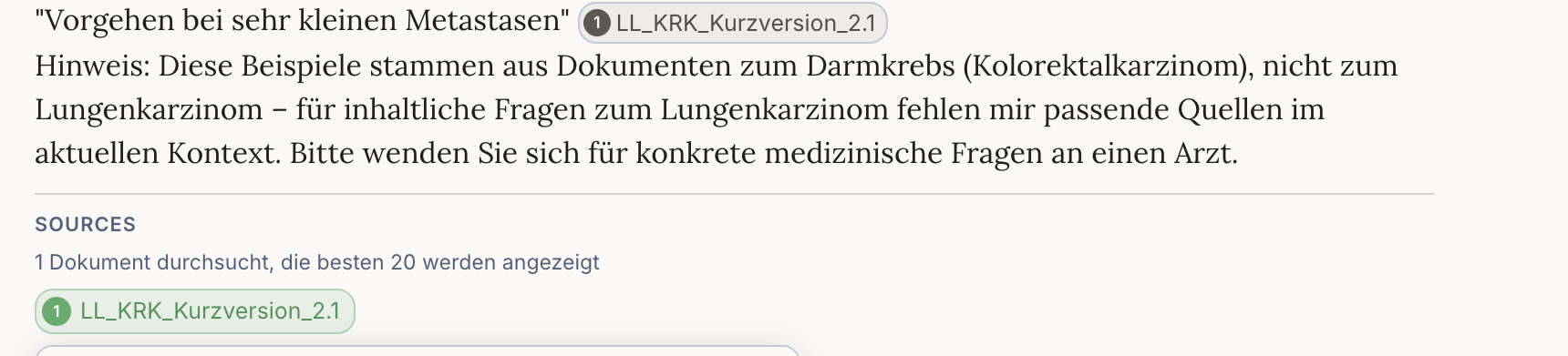
In the answer text: wherever a statement is backed by a document, a numbered chip with the document name appears, for example ① LL_KRK_Kurzversion_2.1. The chip sits exactly at the point it supports.
Below the answer: a dedicated SOURCES section brings together every source used. Directly beneath it is the coverage indicator:
1 Dokument durchsucht, die besten 20 werden angezeigt
It tells you how many documents were searched for your question. Below that, each source follows as its own chip with a number and file name.
Why "the best 20"?
The entire knowledge base is searched – but only the 20 most relevant passages are displayed. With large document collections, you therefore won't necessarily see every matching passage.
If you suspect something is missing, ask a narrower, more specific question. The selection of 20 passages then shifts towards the area you care about.
Step by step
- Open an app that has documents attached.
- Ask your question as usual.
- Watch for the numbered chips in the answer – they show which statement comes from where.
- Look at the SOURCES section below the answer: the coverage indicator and the list of documents used.
- Click a source chip to expand the passage.
What an expanded source shows
Expanding a source reveals four things:
- the file name of the original document, including its extension
- the number of sections the document was split into
- a download icon for downloading the original document
- the quoted passage – the place the answer relies on

The download always gives you the complete original document – not just the quoted excerpt.
Notes
Note
- The entire knowledge base is searched, not just the first matches found. The display is then limited to the 20 most relevant passages.
- Source references work in all interface languages. Individual labels and the coverage line may appear in a different language than the rest of the interface.
- Sections are created when the document is processed. Their number says something about the size of the document, not about the quality of the answer.
- For important statements, always check the passage in the original document.
Frequently asked questions
Why don't I see any sources? Source references only appear for answers that draw on stored documents. In a normal chat, or in an app without a knowledge base, there are none.
What does the number in the chip mean?
It links the statement in the text to the matching entry in the source list below. Chip ① belongs to source ①.
What does "1 Dokument durchsucht, die besten 20 werden angezeigt" mean? One document was searched, and of the passages found, the 20 most relevant are displayed.
Can I download the original document? Yes, using the download icon in the expanded source. You receive the complete document.
What are sections? The parts a document was split into during processing. The assistant searches within them for the matching passages.
The answer cites a source I didn't expect – what now? Expand the source and read the quoted passage. That tells you whether the passage genuinely fits your question or whether you should make the question more precise.