Licensed to be used in conjunction with basebox, only.
// ai chat
Personalization
Brief description
Under Personalization you record once who you are and how the assistant should answer you. The area comprises three fields: your preferred form of address, a short description of your work, and instructions on how answers should be written. The help text in the interface sums it up:
Erzählen Sie dem Assistenten von sich. Diese Angaben werden in allen Ihren Chats berücksichtigt.
(Tell the assistant about yourself. These details are taken into account in all your chats.)
So you don't have to repeat these details in every question – they apply to all your conversations.
What is this used for
How should the assistant address you?
Here you decide which name and which form of address you would like – your first name, your surname with a title, or an informal form.
Example: Frau Weber, Max, Du
What best describes your work?
This gives the assistant your professional context. It can then tailor answers to your field and your daily work without you having to explain it every time.
Example: Ich arbeite im Personalwesen einer mittelständischen Verwaltung.
Instructions for the assistant
Here you describe not what you want to know but how the answer should be written: language, length, tone, handling of technical terms. The field holds up to 1000 characters; a counter below it shows your usage as you type, for example 151 / 1000.
Example instructions
Antworte immer auf Deutsch. Fasse dich kurz und vermeide Fachbegriffe.Erkläre Fachbegriffe zusätzlich in einfachen Worten.Antworte in Stichpunkten, nicht in Fließtext.Nenne bei Empfehlungen immer auch die Nachteile.Wenn du dir bei einer Angabe nicht sicher bist, weise ausdrücklich darauf hin, statt zu raten.
Short, unambiguous rules work more reliably than long texts. Simply write several instructions one below the other.
Your instructions work in a similar way to the organization-wide system prompt that administrators can define – except that you set them yourself, for your own conversations.
Where to find the setting
Open your profile – the page is called Ihr Profil. The Personalization area sits between the language setting and the Sicherheit (security) section and contains the three fields one below the other.
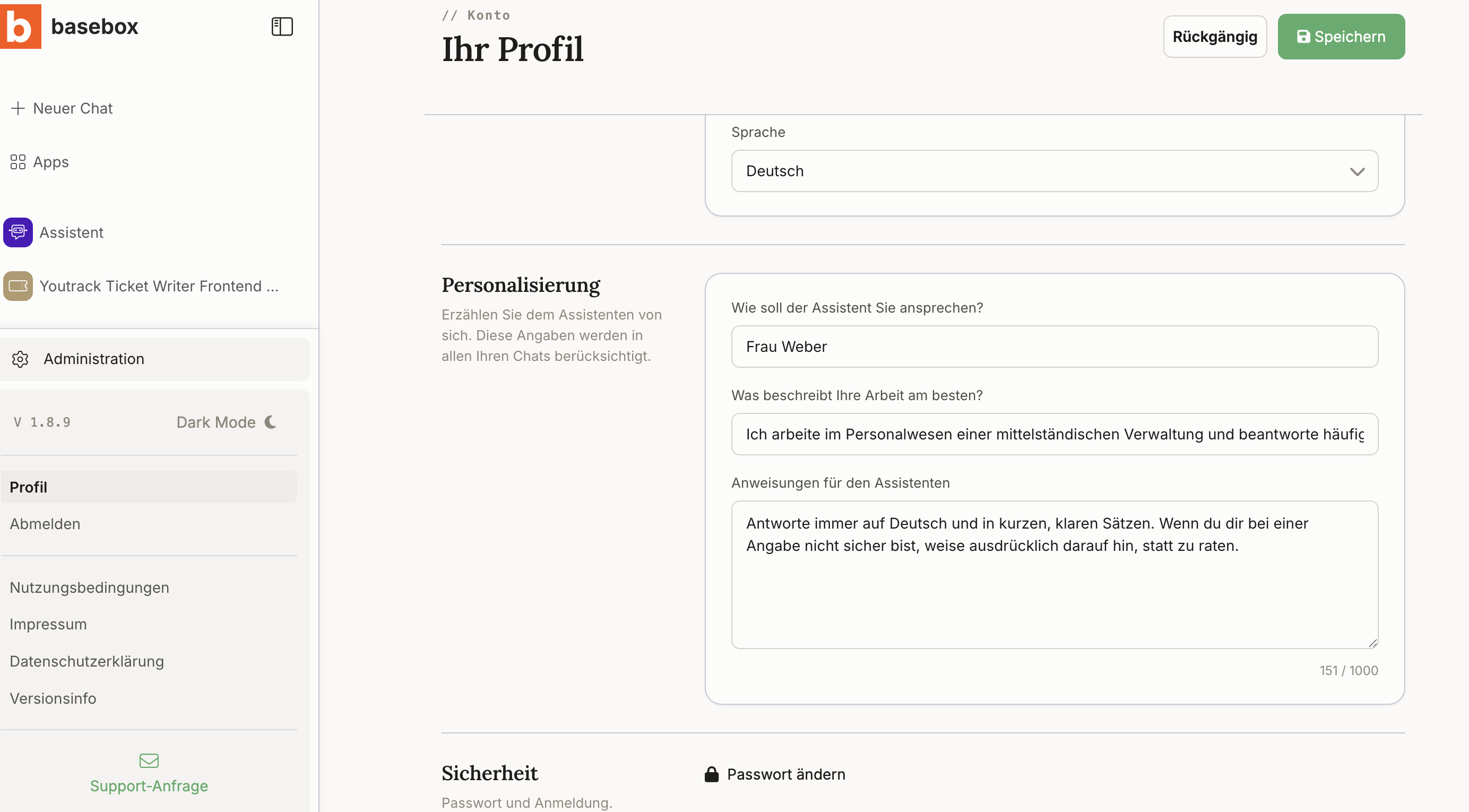
Step by step
- Open your profile and scroll to the Personalization area.
- Under "Wie soll der Assistent Sie ansprechen?" enter your preferred form of address.
- Under "Was beschreibt Ihre Arbeit am besten?" briefly describe your professional context.
- Under "Anweisungen für den Assistenten" write your instructions on how answers should be written – up to 1000 characters.
- Click Speichern (save) in the top right. The details apply from your next conversation onwards.
Use Rückgängig (undo) to discard changes you haven't saved yet.
You don't have to fill in all three fields. Each one works on its own; empty fields are simply not taken into account. To withdraw a detail, clear the field and save again.
How this interacts with organization-wide settings
Both apply at the same time
If your organization has defined a system prompt, it applies in addition to your personal details. Neither setting overrides the other – the assistant takes both into account.
In practice that means: you cannot lift the organization-wide framework, but you can add your own preferences within it. If the two genuinely conflict, contact your administrators.
Notes
Note
- The details apply to all your conversations, including new chats and apps.
- They take effect from your next conversation – ongoing chats do not pick up the change retroactively.
- Your details are effective only for you and are not visible to other people.
- The 1000-character limit applies solely to the "Anweisungen für den Assistenten" field, not to the form of address or the work description.
- Do not enter confidential details here that shouldn't feed into every conversation – the fields are taken into account in all chats.
Frequently asked questions
Do I have to fill in all three fields? No. Each field works on its own; empty fields are not taken into account.
Do my details apply to other people? No, only to your own conversations.
Do they also apply in apps? Yes, they work in all your conversations.
What are the 1000 characters for – does that cover everything? Only the "Anweisungen für den Assistenten" field. A counter below it shows how much you have already used.
What happens if my instruction conflicts with the organization's system prompt? Both settings apply together; you cannot lift the organization-wide one. If there is a genuine conflict, ask your administrators.
Do the details take effect immediately in an ongoing chat? No, only from your next conversation.
How do I remove a detail? Clear the field and save – it will then no longer be taken into account.