Licensed to be used in conjunction with basebox, only.
// ai chat
Web Search
Brief description
Web search lets the assistant retrieve current, publicly available information from the internet. It is switched off by default and must be switched on actively every time you use it – it never stays on permanently. As soon as you leave the chat or sign in again, it switches itself back off.
This page explains both in detail: exactly how the toggle behaves, and what happens to your data once a search leaves the building.
What is this used for
For questions whose answer is not in your own documents and which the assistant cannot answer from its model knowledge either – for example because they concern current developments or because something has changed since the model's training cut-off.
The reverse applies too: if your question is about the documents behind an app, you do not need web search. That is what the knowledge base is for, and its answers are cited and verifiable.
How the toggle works
You switch web search on and off using the "Web" toggle in the input bar, right next to the "+" symbol.
Three levels decide together
Whether you can search does not depend on your toggle alone:
- Your organization can enable or disable web search for the entire installation. This organization-wide switch belongs to the administrators and works independently of your toggle in the chat. If you cannot find the "Web" toggle at all, web search has not been enabled for your installation.
- Your toggle in the chat decides whether searching is allowed in this chat.
- The consent prompt additionally requires your explicit agreement before the first search.
When the toggle resets
This is the point that is most often misunderstood:
Web search switches back off when you leave the chat and when you sign in again
There is no time span and no inactivity timeout. The toggle is reset by two events:
- You leave the chat – for example because you switch to another chat or close the view.
- You sign in again – a new sign-in also sets the toggle to off.
That is why you have to switch it on actively again every time you use it. Once granted, an activation does not last, does not travel with you into the next chat, and does not survive a new sign-in.
This is intentional: every web search should be a deliberate decision, not a setting you configure once and then forget.
The consent prompt
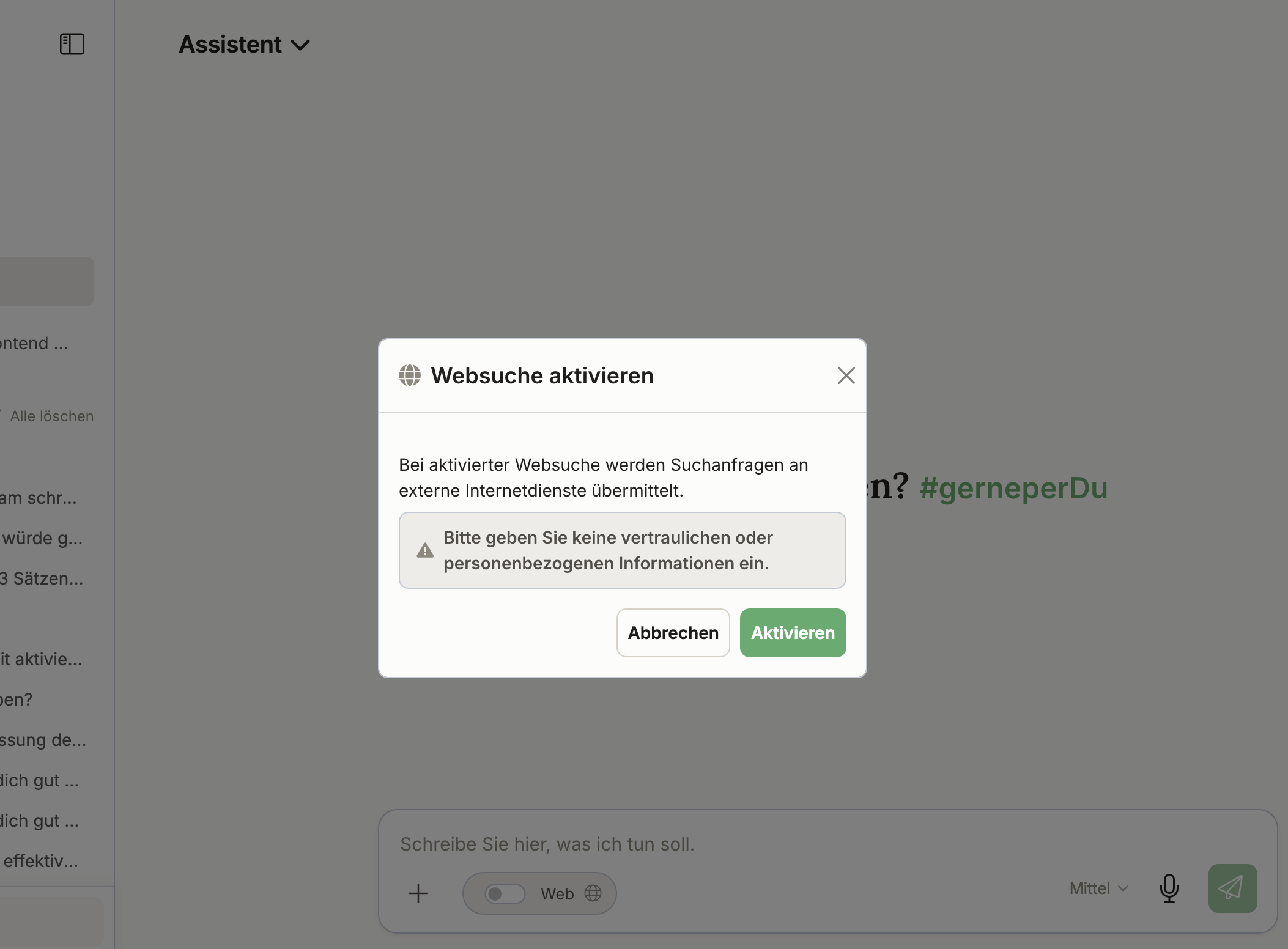
Before the first search, the "Enable web search" dialog window opens. It explains:
When web search is enabled, search queries are transmitted to external internet services.
Below that, the warning is highlighted:
Please do not enter any confidential or personal information.
You have two options:
- Enable – web search is switched on and the search is carried out.
- Cancel – no search is performed, web search stays off.
How you can tell that a search is running
While the assistant is searching, a short note appears above or next to the answer indicating which tool is currently in use – for example "Searching the web …". So you can see when a request goes out, and do not have to infer it from the answer.
What happens to my data
A web search is the one case in which something leaves your basebox installation. Here is what happens:
Your search query goes out. It is transmitted to an external search provider and thereby leaves your basebox installation. That is the essence of the matter and cannot be avoided – without a request going out there is no web search.
Which provider that is depends on your organization. Which search provider is actually used can vary depending on your organization's configuration. Different web search variants with different providers may be set up. If you need to know exactly where your queries go – for a data protection impact assessment, for instance – ask your administrators which variant is configured for you.
Your identity does not go with it. No basebox user identity is transmitted with the search query. The search provider therefore does not learn who searched. Your IP address is not passed on either: the request leaves the building through basebox's own connection, not from your device.
Results come back defused. Before search results are passed to the language model, they are reduced to plain text – no scripts, no active code. There is therefore no point along this path at which code from a website could run.
What is logged is that a search happened – not what it was about. Every web search call is recorded in the audit log: organization, user, which tool, which provider, success or failure, and a timestamp. The content of the search query itself is not stored – only this metadata is logged.
Notes
No confidential or personal information
This warning is in the consent dialog for good reason: whatever you write into a search query goes to the external search provider. Names, case numbers, diagnoses, internal project designations or other confidential details therefore do not belong in a web search – not even in part or paraphrased.
The fact that basebox does not log the query and sends no user identity changes nothing about this: the provider sees the text of the query.
Note
- No credentials required. Unlike most connectors, you do not have to store anything for web search.
- You do not invoke the search yourself. You ask your question; the assistant decides whether a web search is helpful – provided the toggle is on.
- Check results from the web. The assistant reports what it finds. The open internet is not a vetted source.
- No internet connection, no web search. In fully air-gapped installations the feature is not available.
Frequently asked questions
Does web search stay enabled when I switch chats or leave the chat? No, it switches itself back off and has to be enabled again if needed.
Which search provider is used? That can differ depending on your organization's configuration. Your administrators know which variant is set up for you.
Is there a time limit after which web search switches off? No. No timeout is involved. The toggle is reset by leaving the chat and by a new sign-in.
Do I have to give consent every time? The prompt appears before the first search. Since the toggle falls back anyway when you leave the chat and when you sign in again, switching it on is always a deliberate, repeated action.
Does the search provider learn who I am? No. Neither a basebox user identity nor your device's IP address is transmitted.
Is what I searched for stored? No. The audit log records that a web search took place, together with the time, user and provider – but not the text of your query.
Why can't I see the "Web" toggle? Then your organization has not enabled web search for your installation.
Can I switch web search on permanently for all my chats? No, that is deliberately not provided for. Every use should remain a decision of its own.
Questions about web search in your organization? Contact support