Licensed to be used in conjunction with basebox, only.
// admin
Connectors
Connectors link basebox to external services and tools (technically: MCPs). As an administrator, you enable or disable individual connectors for your entire organization – determining which additional capabilities are available to your users.
Connectors extend basebox beyond chat
Connectors extend basebox with functions that go beyond plain chat – such as access to a knowledge base, a web search, a calculator, or a connected specialist system. The central toggle for each connector lets you decide what's usable organization-wide.
You are granting capabilities to your users
When you enable a connector, you pass this capability on to all users in your organization. This transfers responsibility – for example, access to external services or data. Before enabling it, check whether the service is suitable and approved for your organization, and disable connectors that are no longer needed.
Connectors are under Administration → Connectors
Open Administration → Connectors in the sidebar. Under "Connectors from us", you'll see the available connectors as tiles with:
- the icon and name of the service
- a short description (e.g., purpose or base URL)
- a toggle on the right to turn the connector on or off for the organization
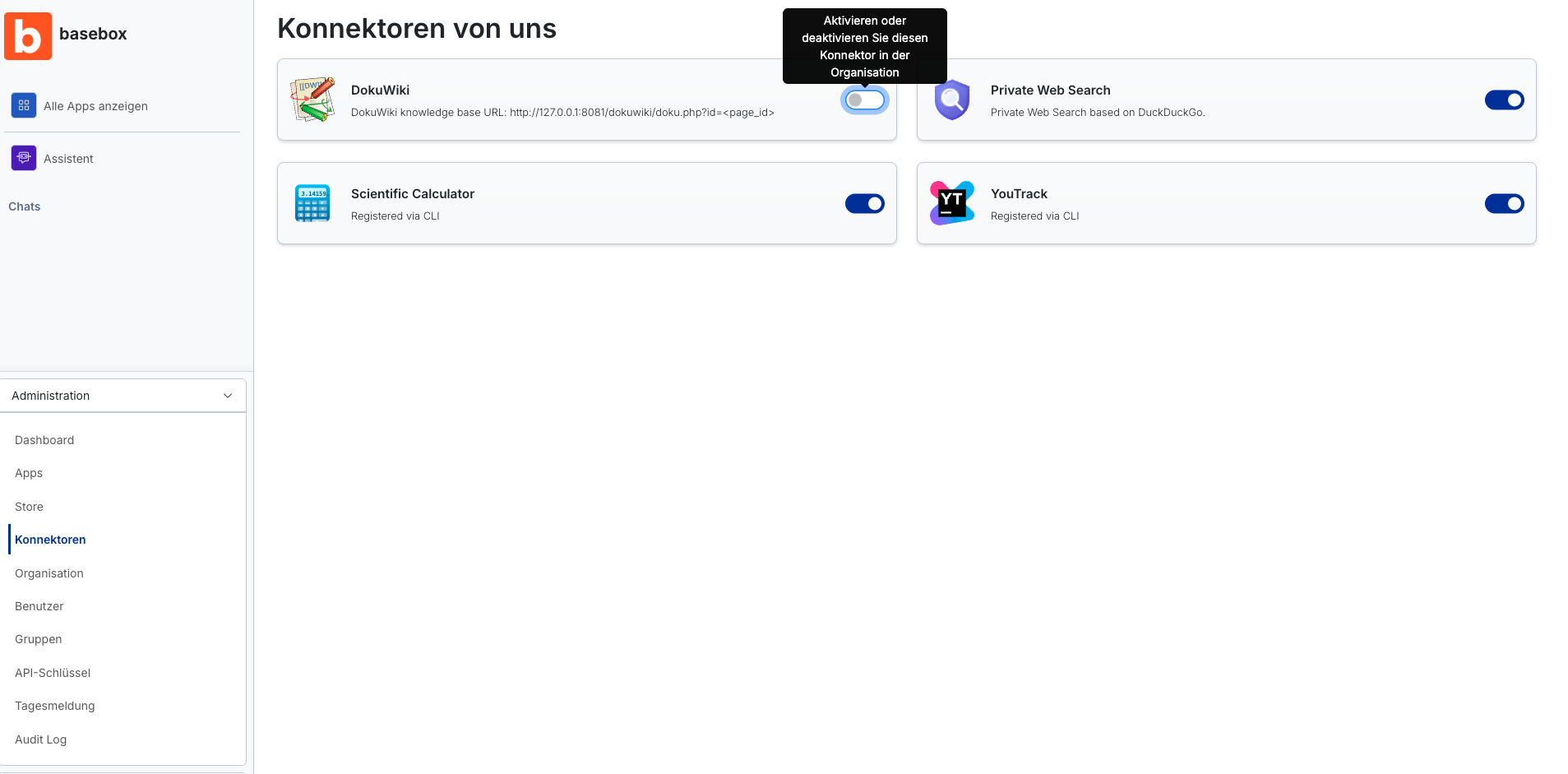
Switching connectors on and off
Enabling a connector for the organisation
- Open Administration → Connectors
- Find the desired connector in the list
- Set the toggle on the right of the tile to on
The connector is now available to all users in your organization.
Disabling a connector
- Open Administration → Connectors
- Set the connector's toggle to off
The capability is thereby revoked organization-wide again.
Testing a connection
You can test a connector with a single click. basebox then shows whether the connection is currently healthy.
Connectors need two approvals
Note
- The toggle acts organization-wide: it enables or disables the connector for all users.
- Connectors are additionally enabled per app: in the app settings you define which connectors are available to an app. A connector enabled in one app is not automatically available in other apps.
- Each person signs in to the connector with their own account. This way, everyone only sees what they are allowed to see.
- The assistant knows which connectors are available and uses them when helpful.
- Some connectors are "Registered via CLI" – they were technically integrated via the command line and appear here for management.
- Managing connectors is reserved for administrators.
Credentials are stored securely
Connector credentials are stored write-only: they are never sent back to the browser, are hidden in logs, and are never auto-filled. A badge indicates when credentials have been set.
Frequently asked questions
What is a connector? A connection from basebox to an external service or tool (technically referred to as an MCP) that extends basebox with additional capabilities.
What happens when I enable a connector? The capability becomes available to all users in your organization. You are thereby granting access to the respective service.
Can I disable a connector again? Yes, using the same toggle. After disabling it, the connector is no longer available to users.
What does "Registered via CLI" mean? That the connector was integrated via the command line. It then appears here in the overview and can be turned on or off like the others.