Licensed to be used in conjunction with basebox, only.
// admin
System Prompt
Brief description
As an administrator, you use the system prompt to define guidelines that apply to all chats in your organization – for example, a house style, a required language, or rules of conduct for the assistant.
What is this used for
To enforce consistent guidelines organization-wide, without each person having to set them individually. Typical use cases:
- A consistent style – for instance, always answering factually and concisely.
- A fixed language – always answering in German, regardless of the language of the question.
- Rules of conduct and safety rules – the assistant should decline certain topics or types of request.
Where to find the setting
Open Administration → Organization in the sidebar. There you'll find the System prompt section with an input field. The help text below it reads:
Applies to all chats in your organization. Leave empty for the default.
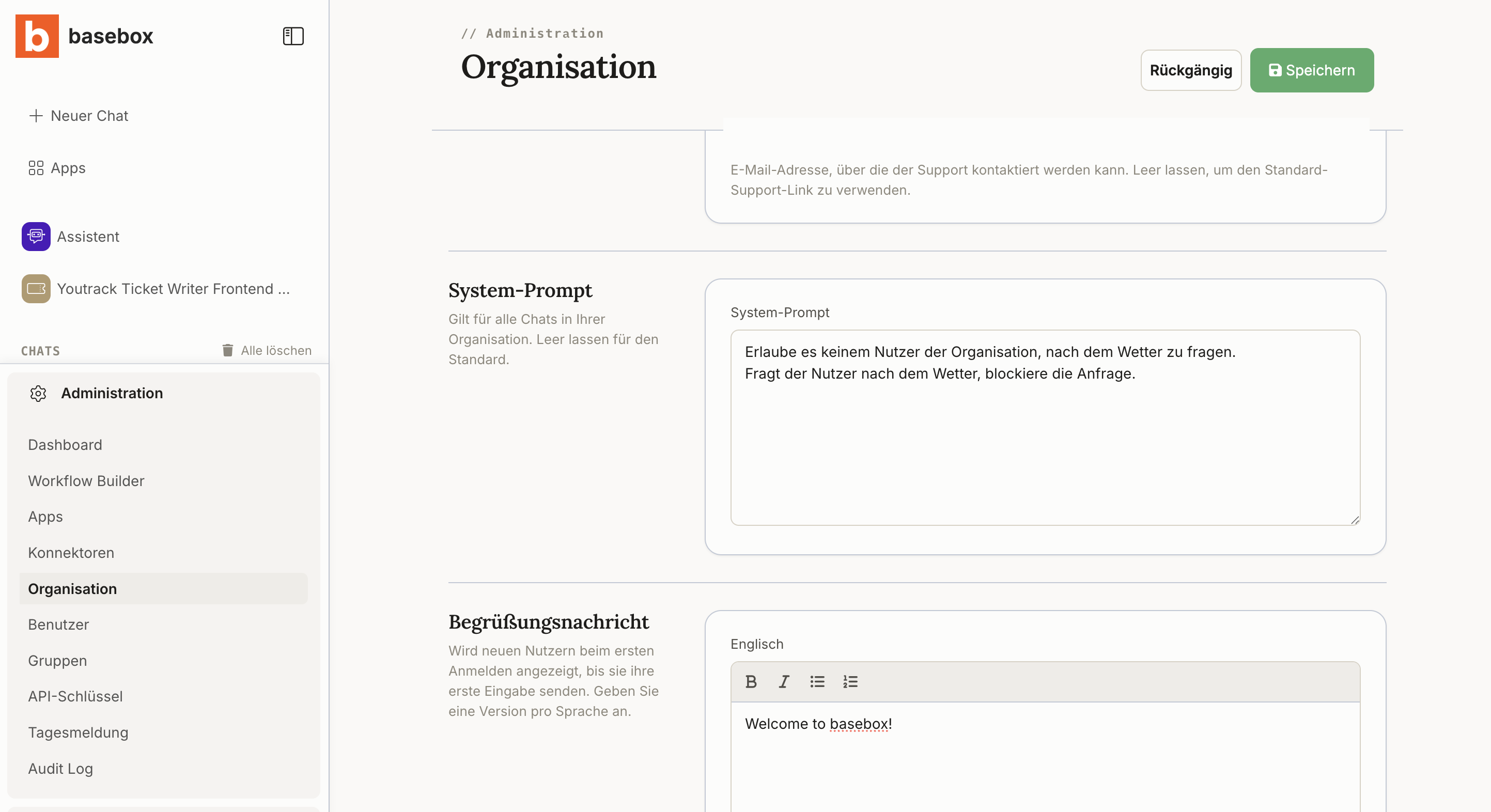
Step by step
- Open Administration → Organization.
- Enter your guidelines in the System prompt field.
- Save. The guidelines apply to all chats in your organization from now on.
Leave the field empty if you want to return to the default behavior.
Enforcing rules of conduct and safety rules
The system prompt lets you do more than set the style: you can also forbid the assistant from engaging with certain topics or types of request.
Example (the example prompt text is in German, as entered in the field):
Erlaube es keinem Nutzer der Organisation, nach dem Wetter zu fragen. Fragt der Nutzer nach dem Wetter, blockiere die Anfrage.
With this guideline in place, the assistant declines such requests – even when users rephrase or reword the question.
No one-hundred-percent guarantee
The system prompt acts as a behavioral guideline for the language model – not as an independent technical filter rule like a firewall. In practice it is followed very reliably, but there is no absolute guarantee that an instruction will take effect in every conceivable case.
Wherever strict compliance or security requirements apply, treat the system prompt as an additional layer of protection rather than your only control. Anything that must be technically enforced belongs in app and connector approval.
Notes
Note
- The system prompt applies to all chats in your organization, not just to individual apps.
- An empty field means the default behavior applies.
- Users can additionally set their own personalization settings. Both guidelines apply together.
Frequently asked questions
Do personal instructions override the organization-wide ones? No, both apply together.
What is the setting called in the interface? System prompt – found under Administration → Organization.
Can I use it to block topics? Yes, you can forbid the assistant from engaging with certain topics or types of request. This guideline is followed very reliably, but it is a behavioral guideline for the language model, not a technical block.
What happens if I leave the field empty? The assistant's default behavior applies.
Does the system prompt also apply to users' own apps? Yes, it applies to all chats in your organization.