Licensed to be used in conjunction with basebox, only.
// security
Software bill of materials (SBOM)
Applies to
Product: Cloud · Server · Audience: security / compliance reviewers · administrators · procurement
Yes, there is an SBOM (software bill of materials). basebox generates it automatically for every release. It lists all software components basebox consists of – its own components and open-source libraries, each with its version. Customers download it in their basebox; before purchase we send it on request.
The SBOM is under "Version Info" in basebox
- Click your e-mail address at the bottom left of the sidebar.
- Choose Version Info.
- At the bottom of the page there are two links:
- SBOM (Software Bill of Materials) – all software components (1) shows the components as a table in the browser, split into backend, frontend and Keycloak.
- Download SBOM (CycloneDX JSON, machine-readable) (2) downloads the file for your tools.
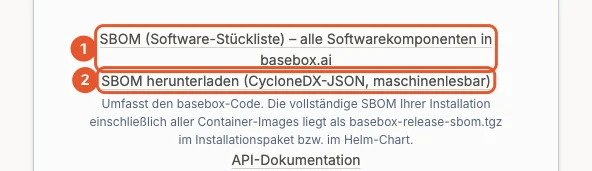
This file covers the basebox code of the version that is running. The complete SBOM of the installation, including all container images, is in the Helm chart (see below).
The complete SBOM is in the Helm chart and the installation package
From chart version 0.3.34 (basebox 1.9.3), the Helm chart contains the file sbom/basebox-release-sbom.tgz. It contains:
release-sbom-merged.cdx.json– the merged SBOM of all components of the installation,parts/– a separate SBOM per container image, for example backend, frontend, inference, Keycloak, document search and the bundled connectors.
This is how you get the file from the chart; no registry login is needed:
helm pull oci://gitea.basebox.health/basebox-distribution/helm/basebox.ai --version 0.3.34 --untar
tar -xzf basebox.ai/sbom/basebox-release-sbom.tgz
For installations without internet access, the same file is in the installation package.
Before purchase we send the SBOM on request
Not using basebox yet? Request the SBOM via basebox.ai/en/contact. It is part of the documents for your review, together with the ISO 27001 certificate, DPA and TOMs (Security on basebox.ai).
The SBOM follows CycloneDX 1.6 according to BSI TR-03183-2
The files are in CycloneDX 1.6 (JSON) format, according to the German Federal Office for Information Security's technical guideline BSI TR-03183-2. Common tools for vulnerability and licence management read them directly, for example Dependency-Track.
For each component the SBOM contains:
| Field | Meaning |
|---|---|
| Name and version | the exact component contained in basebox |
| Package URL (purl) | unique identifier that tools use to match known vulnerabilities |
| Licence | licence of the component, where the package states it |
| Checksum | fingerprint, where available |
| Dependencies | which component includes which other one |
Your data, your configuration and credentials are not in the SBOM; it only describes the software.
Every version has its own SBOM
- Cloud: basebox updates your environment. Under Version Info you always find the SBOM of the version that is running.
- Server: the SBOM of the installed version applies. After an update, download the new SBOM if you maintain it in your own tool.
With the SBOM you check vulnerabilities, licences and the supply chain
- check whether a newly published vulnerability (CVE) affects a component in your basebox,
- check the licences of the open-source software included,
- document the supply chain, for example for NIS2, B3S or tenders.
A component with a vulnerability in the SBOM does not mean basebox is exposed: often the affected function is not used. If in doubt, ask support. Report vulnerabilities in basebox to security@basebox.ai.
Frequently asked questions
How often is the SBOM updated? Automatically with every release.
Is basebox open source? No. basebox contains open-source components; which ones is listed in the SBOM.
What applies under the Cyber Resilience Act? The SBOM obligation falls on the manufacturer, i.e. basebox. basebox implements further obligations under the Cyber Resilience Act by December 2027.
Are the AI models in the SBOM? The SBOM describes the software, including the inference service. Which AI models basebox uses and where they come from is in the model register.
Need help? Contact support