Licensed to be used in conjunction with basebox, only.
Web Search in basebox
Introduction to How We Keep It Safe
What this is: A short, readable introduction to how web search works in basebox and how we make it as safe as it reasonably can be. Think of this as the overview; the full policy document is the in-depth reference behind it.
The honest starting point
Web search is one of the most useful things an AI assistant can do, and it is the capability almost every customer asks for first. It is also, by some distance, the hardest one to make safe. We want to be straight about this from the beginning: once the open web is part of the loop, no provider — basebox or anyone else — can fully guarantee the safety of the system. We will not pretend otherwise.
That is only half the story, though, and the less important half. The part we care about is this: making web search as safe as it reasonably can be, being precise about exactly where the limits are, being transparent about every risk we know of or suspect, and being clear about what we already do and what we could do next. This page is our honest, written basis for that conversation — the same basis we share with every customer.
How web search works in basebox
When a user asks a question that needs the web, the request does not go out from their laptop/box. It is routed through basebox running on your own premises, sent to a single, explicitly configured search provider — by default Staan, the European search index built by Qwant and Ecosia, with DuckDuckGo (or another provider your admin approves) available as an alternative — and the results are reduced to plain text only before the AI ever sees them. No scripts, no active content, no other websites, no other providers.
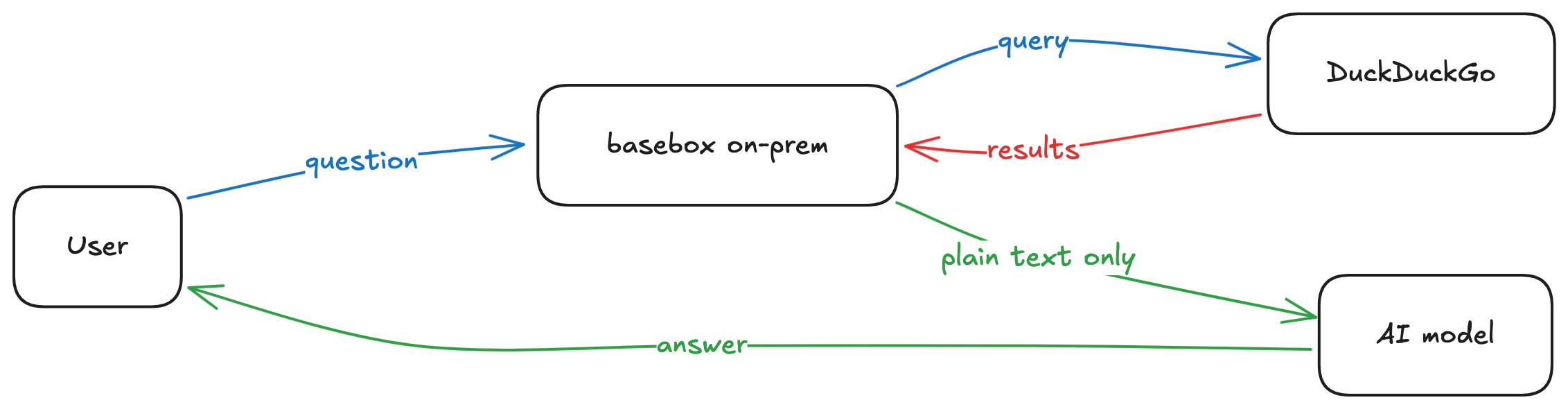
A few properties of this design are worth calling out, because they are the foundation everything else is built on:
- It runs on your premises. Queries leave through basebox's own connection, not from individual user devices. Your users' IP addresses are never exposed to the search provider.
- One provider per connector, and nothing else. Each web-search connector reaches exactly one search provider — no third-party search SDKs, no fetching of arbitrary sites. This holds for whichever provider you choose: Staan (the default) is an EU company processing queries in EU data centres with no tracking or profiling and a DPA available; DuckDuckGo does not build user profiles or track searches; the same single-provider discipline applies to any other provider we add. The boundary is not just policy: an egress allow-list enforced at the MCP gateway means the connector cannot reach any host other than its declared provider.
- Plain text only. With an API-based provider such as Staan, results arrive as structured data — basebox never fetches or renders web pages itself, so there is nothing to strip in the first place. Where a provider requires reading pages, they are stripped of scripts, styles, and any other active content before any text reaches the AI. In either case there is no place in this path where code from a website can run, and the amount of text per result is capped.
- Every call is recorded. Each tool invocation is written to an audit log (organisation, user, which tool, which provider, success or failure, and timestamp) so usage is accountable. The log records this metadata only — by design it does not store the text of the query itself.
What can go wrong — in plain terms
We group the real risks into three, in plain language.
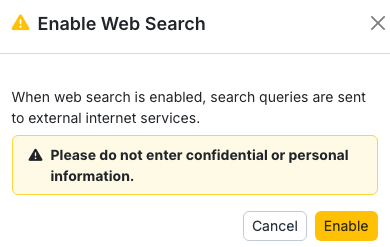
1. Sensitive information typed into a query (the everyday risk). If a user types confidential details into a search box, those details are sent to the search provider — they leave your premises. This is the most realistic day-to-day risk, and it is best handled by who you let use the tool and a short usage rule (for example: no patient names or case details in a web search), not by software trying to guess what is sensitive. With the default Staan provider the query at least stays within EU jurisdiction (EU data centres, DPA available), which reduces the regulatory exposure of this risk — but it does not remove it: the rule above applies with every provider. basebox provide additional visual confirmation every time Web Search is enabled on each app.
2. A web page that tries to "talk to" the AI ("prompt injection"). A malicious page can contain hidden text designed to give the AI instructions. A well-trained model usually ignores this, but no model is 100% reliable. On its own, the worst realistic outcome is a misleading answer.
3. Web search combined with internal-data tools in the same app (the one that matters most). This is the case we take most seriously. If web search and an internal-data tool (e.g. your wiki or files) are switched on in the same app, an injected instruction from a web page could try to read internal data and smuggle it out through a follow-up search. This is the genuine exfiltration path.
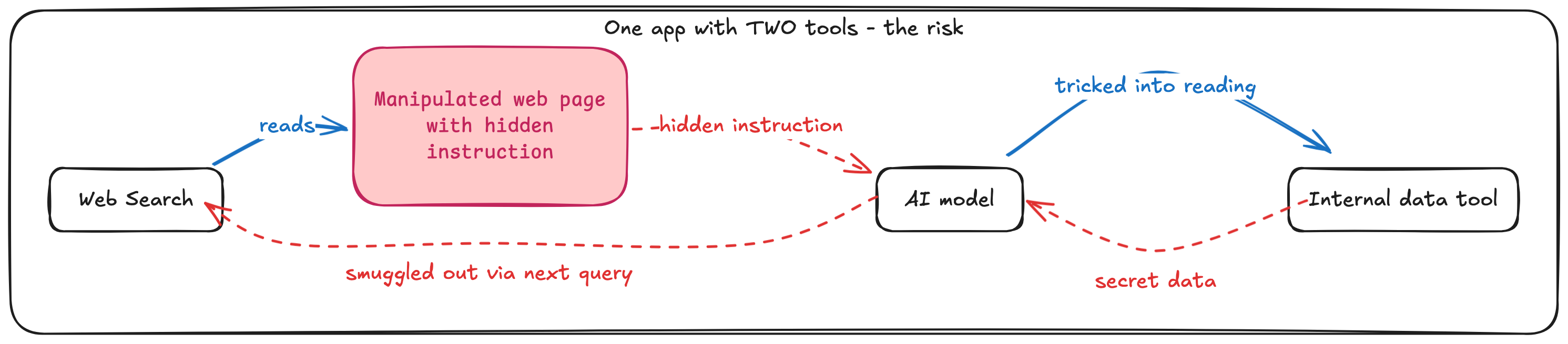
The good news is that this most-serious risk has a clean, architectural answer that does not depend on how clever the AI model is.
How we make it as safe as it reasonably can be
Our approach is defense in depth: several independent layers, so that no single failure exposes you. Some layers are in place today; others are on our roadmap, and we are transparent about which is which.
In place today:
- On-premise, single-provider routing (Staan by default — EU index, EU processing; DuckDuckGo or another approved provider where configured).
- Enforced egress allow-listing. Each connector may only reach its declared provider hosts (for Staan:
api.staan.aiand nothing else); the MCP gateway blocks all other outbound traffic from the connector. - Text-only ingestion — API-based providers return structured data (no page is ever fetched or rendered by basebox); scraping-based providers have all scripts and active content removed. Per-result size caps in both cases.
- Per-call audit logging (metadata, not query content).
- Per-app provider scoping. Each app is configured with exactly which connectors it may use, and that boundary is enforced: a connector enabled in one app does not bleed into another. So you can run an app whose only connector is web search, entirely separate from an app that uses your internal wiki.
- Per-user opt-in on top of that — within what an app offers, each user enables the connectors they want.
- Off by default, and off in every new conversation — enabling web search is a deliberate choice each time, and basebox asks for the user's agreement before the first search. It can also be enabled or disabled for a whole installation.
- Content-aware framing, which wraps web results so the AI treats them as data to read, never as instructions to follow.
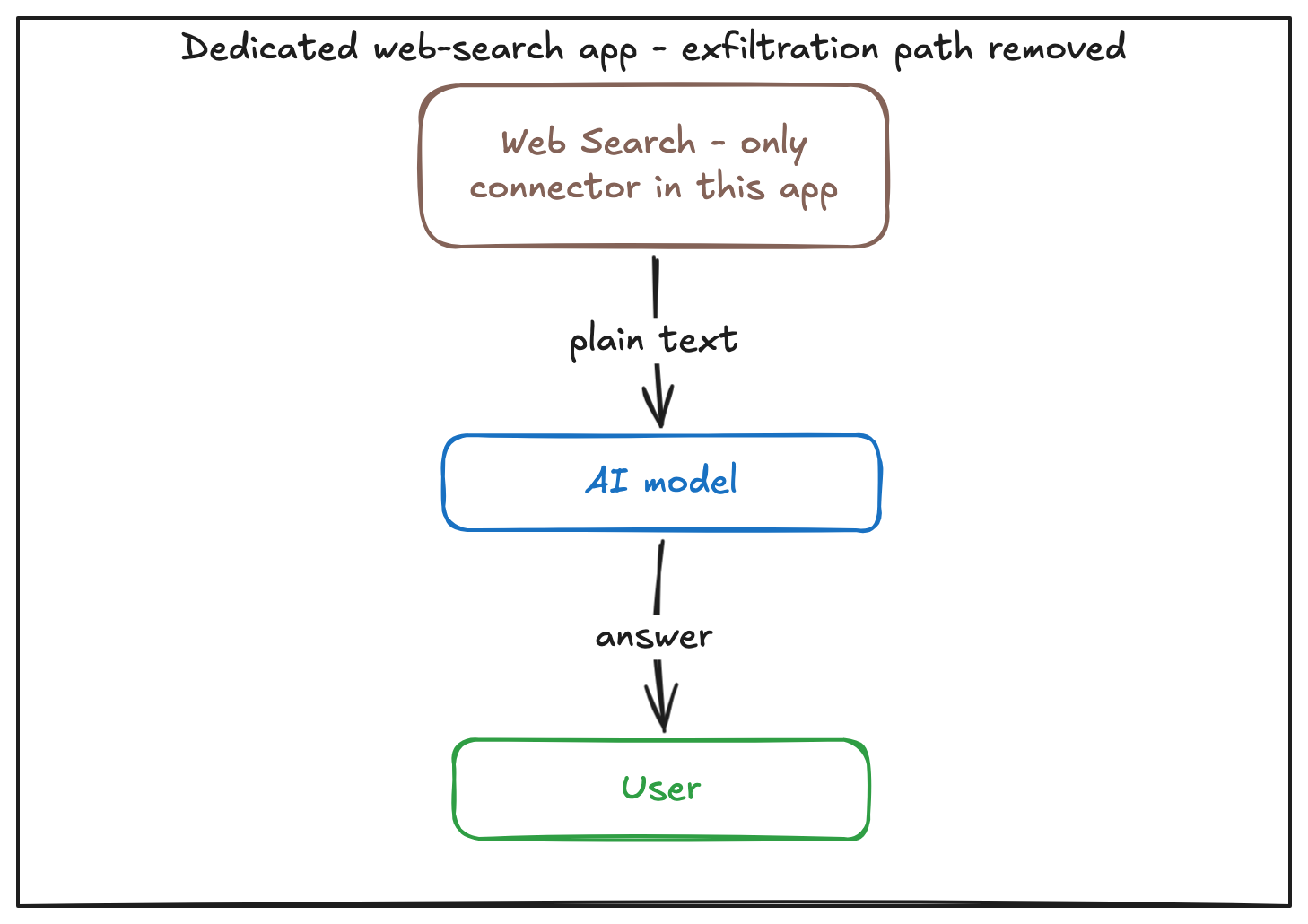
The single most effective control is also the simplest: run web search in a dedicated app whose only connector is web search. With no internal-data connector present in that app, the exfiltration path (risk 3) simply does not exist — regardless of how the model behaves. Because app boundaries are enforced, this is a configuration choice you make per app, not something that relies on the model's good behaviour.
On our roadmap (transparent about what is next):
- Finer-grained tool curation within a connector, and a one-click "web-search-only" app preset, so the recommended dedicated-app setup is even easier to stand up.
- Per-group tool visibility and optional human-in-the-loop approval.
We deliberately do not log the content of queries (you are air-gapped; we do not hold your data), and we will not ship keyword or output filtering dressed up as a security guarantee — because it creates false confidence rather than real protection.
Your options — you decide, with full information
Our goal is to give you everything you need to make an informed, conscious decision. With this introduction (and the full policy behind it) in hand, you can choose any of these paths, and we are glad to help with each.
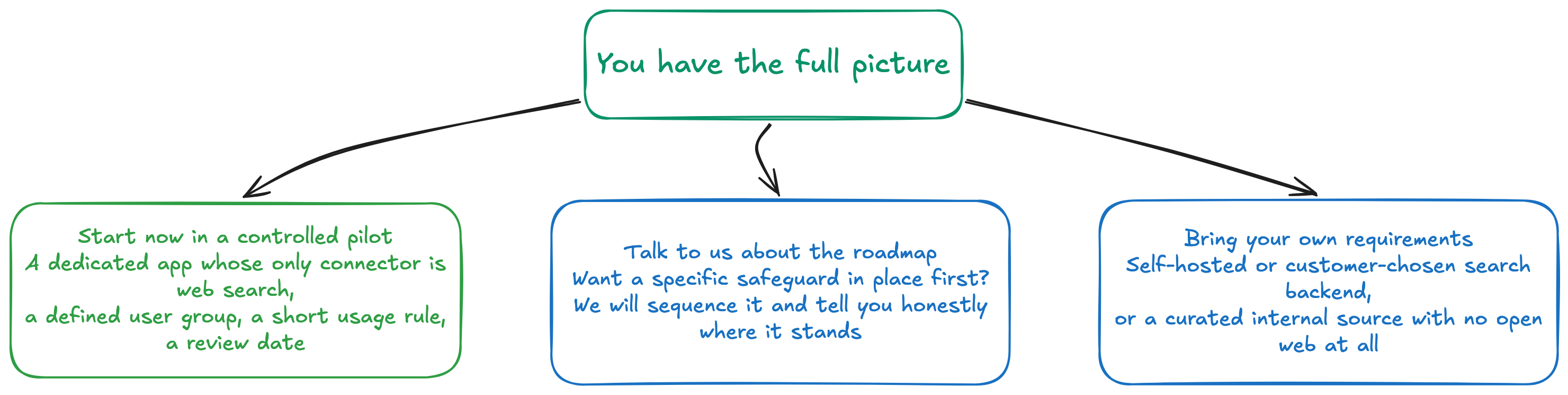
Most customers — including regulated ones such as hospitals — start with the controlled pilot: a dedicated app whose only connector is web search, limited to a defined group, with a one-line usage guideline and a review date. It is a defensible, sensible default rather than an all-or-nothing choice.
The one-line takeaway
We can make web search as safe as is reasonably possible, and be completely transparent about the risk that remains. The open web means that residual risk is never exactly zero — so the final decision is yours to make consciously, and ours to support honestly.
Want the depth behind this page?
This introduction is intentionally short. The full Web Search MCP — Security & Safety Policy covers everything in depth: the complete threat model and risk assessment (likelihood × impact, residual risk, mappings to OWASP LLM Top 10 and GDPR/HIPAA), every mitigation in place and planned, how our approach compares to the frontier AI labs, the full range of alternative providers and their trade-offs, and the shared-responsibility model. We provide it on request and recommend it for your security and compliance stakeholders.